ページ

2013年12月12日木曜日

Basic Tutorial 3 をやってみる

Basic Tutorial 3 は地形、空、霧

まずは地形から
とりあえず最初のビルド出来る状態までやってみる。

/*
-----------------------------------------------------------------------------
Filename:    TutorialApplication.h
-----------------------------------------------------------------------------

This source file is part of the
   ___                 __    __ _ _    _ 
  /___\__ _ _ __ ___  / / /\ \ (_) | _(_)
 //  // _` | '__/ _ \ \ \/  \/ / | |/ / |
/ \_// (_| | | |  __/  \  /\  /| |   <| |
\___/ \__, |_|  \___|   \/  \/ |_|_|\_\_|
      |___/                              
      Tutorial Framework
      http://www.ogre3d.org/tikiwiki/
-----------------------------------------------------------------------------
*/
#ifndef __TutorialApplication_h_
#define __TutorialApplication_h_

#include 
#include 
#include "BaseApplication.h"

class TutorialApplication : public BaseApplication
{
public:
 TutorialApplication(void);
 virtual ~TutorialApplication(void);

protected:
 virtual void createScene(void);
 virtual void createFrameListener(void);
 virtual void destroyScene(void);
 virtual bool frameRenderingQueued(const Ogre::FrameEvent& evt);

private:
 Ogre::TerrainGlobalOptions* mTerrainGlobals;
 Ogre::TerrainGroup* mTerrainGroup;
 bool mTerrainsImported;

 void defineTerrain(long x, long y);
 void initBlendMaps(Ogre::Terrain* terrain);
 void configureTerrainDefaults(Ogre::Light* light);
};

#endif // #ifndef __TutorialApplication_h_


/*
-----------------------------------------------------------------------------
Filename:    TutorialApplication.cpp
-----------------------------------------------------------------------------

This source file is part of the
   ___                 __    __ _ _    _ 
  /___\__ _ _ __ ___  / / /\ \ (_) | _(_)
 //  // _` | '__/ _ \ \ \/  \/ / | |/ / |
/ \_// (_| | | |  __/  \  /\  /| |   <| |
\___/ \__, |_|  \___|   \/  \/ |_|_|\_\_|
      |___/                              
      Tutorial Framework
      http://www.ogre3d.org/tikiwiki/
-----------------------------------------------------------------------------
*/
#include "TutorialApplication.h"

//-------------------------------------------------------------------------------------
TutorialApplication::TutorialApplication(void)
{
}
//-------------------------------------------------------------------------------------
TutorialApplication::~TutorialApplication(void)
{
}

//-------------------------------------------------------------------------------------
void TutorialApplication::destroyScene(void)
{

}
//-------------------------------------------------------------------------------------
void getTerrainImage(bool flipX, bool flipY, Ogre::Image& img)
{
 img.load("terrain.png", Ogre::ResourceGroupManager::DEFAULT_RESOURCE_GROUP_NAME);
 if (flipX)
  img.flipAroundY();
 if (flipY)
  img.flipAroundX();
}
//-------------------------------------------------------------------------------------
void TutorialApplication::defineTerrain(long x, long y)
{
 Ogre::String filename = mTerrainGroup->generateFilename(x, y);
 if (Ogre::ResourceGroupManager::getSingleton().resourceExists(mTerrainGroup->getResourceGroup(), filename))
 {
  mTerrainGroup->defineTerrain(x, y);
 }
 else
 {
  Ogre::Image img;
  getTerrainImage(x % 2 != 0, y % 2 != 0, img);
  mTerrainGroup->defineTerrain(x, y, &img);
  mTerrainsImported = true;
 }
}
//-------------------------------------------------------------------------------------
void TutorialApplication::initBlendMaps(Ogre::Terrain* terrain)
{
 Ogre::TerrainLayerBlendMap* blendMap0 = terrain->getLayerBlendMap(1);
 Ogre::TerrainLayerBlendMap* blendMap1 = terrain->getLayerBlendMap(2);
 Ogre::Real minHeight0 = 70;
 Ogre::Real fadeDist0 = 40;
 Ogre::Real minHeight1 = 70;
 Ogre::Real fadeDist1 = 15;
 float* pBlend0 = blendMap0->getBlendPointer();
 float* pBlend1 = blendMap1->getBlendPointer();
 for (Ogre::uint16 y = 0; y < terrain->getLayerBlendMapSize(); ++y)
 {
  for (Ogre::uint16 x = 0; x < terrain->getLayerBlendMapSize(); ++x)
  {
   Ogre::Real tx, ty;

   blendMap0->convertImageToTerrainSpace(x, y, &tx, &ty);
   Ogre::Real height = terrain->getHeightAtTerrainPosition(tx, ty);
   Ogre::Real val = (height - minHeight0) / fadeDist0;
   val = Ogre::Math::Clamp(val, (Ogre::Real)0, (Ogre::Real)1);
   *pBlend0++ = val;

   val = (height - minHeight1) / fadeDist1;
   val = Ogre::Math::Clamp(val, (Ogre::Real)0, (Ogre::Real)1);
   *pBlend1++ = val;
  }
 }
 blendMap0->dirty();
 blendMap1->dirty();
 blendMap0->update();
 blendMap1->update();
}
//-------------------------------------------------------------------------------------
void TutorialApplication::configureTerrainDefaults(Ogre::Light* light)
{
 // Configure global
 mTerrainGlobals->setMaxPixelError(8);
 // testing composite map
 mTerrainGlobals->setCompositeMapDistance(3000);

 // Important to set these so that the terrain knows what to use for derived (non-realtime) data
 mTerrainGlobals->setLightMapDirection(light->getDerivedDirection());
 mTerrainGlobals->setCompositeMapAmbient(mSceneMgr->getAmbientLight());
 mTerrainGlobals->setCompositeMapDiffuse(light->getDiffuseColour());

 // Configure default import settings for if we use imported image
 Ogre::Terrain::ImportData& defaultimp = mTerrainGroup->getDefaultImportSettings();
 defaultimp.terrainSize = 513;
 defaultimp.worldSize = 12000.0f;
 defaultimp.inputScale = 600;
 defaultimp.minBatchSize = 33;
 defaultimp.maxBatchSize = 65;
 // textures
 defaultimp.layerList.resize(3);
 defaultimp.layerList[0].worldSize = 100;
 defaultimp.layerList[0].textureNames.push_back("dirt_grayrocky_diffusespecular.dds");
 defaultimp.layerList[0].textureNames.push_back("dirt_grayrocky_normalheight.dds");
 defaultimp.layerList[1].worldSize = 30;
 defaultimp.layerList[1].textureNames.push_back("grass_green-01_diffusespecular.dds");
 defaultimp.layerList[1].textureNames.push_back("grass_green-01_normalheight.dds");
 defaultimp.layerList[2].worldSize = 200;
 defaultimp.layerList[2].textureNames.push_back("growth_weirdfungus-03_diffusespecular.dds");
 defaultimp.layerList[2].textureNames.push_back("growth_weirdfungus-03_normalheight.dds");

}

//-------------------------------------------------------------------------------------
void TutorialApplication::createScene(void)
{
 // create your scene here :)
 mCamera->setPosition(Ogre::Vector3(1683, 50, 2116));
 mCamera->lookAt(Ogre::Vector3(1963, 50, 1660));
 mCamera->setNearClipDistance(0.1);
 mCamera->setFarClipDistance(50000);

 if (mRoot->getRenderSystem()->getCapabilities()->hasCapability(Ogre::RSC_INFINITE_FAR_PLANE))
 {
  mCamera->setFarClipDistance(0);   // enable infinite far clip distance if we can
 }

 Ogre::MaterialManager::getSingleton().setDefaultTextureFiltering(Ogre::TFO_ANISOTROPIC);
 Ogre::MaterialManager::getSingleton().setDefaultAnisotropy(7);

 Ogre::Vector3 lightdir(0.55, -0.3, 0.75);
 lightdir.normalise();

 Ogre::Light* light = mSceneMgr->createLight("tstLight");
 light->setType(Ogre::Light::LT_DIRECTIONAL);
 light->setDirection(lightdir);
 light->setDiffuseColour(Ogre::ColourValue::White);
 light->setSpecularColour(Ogre::ColourValue(0.4, 0.4, 0.4));

 mSceneMgr->setAmbientLight(Ogre::ColourValue(0.2, 0.2, 0.2));

 mTerrainGlobals = OGRE_NEW Ogre::TerrainGlobalOptions();

 mTerrainGroup = OGRE_NEW Ogre::TerrainGroup(mSceneMgr, Ogre::Terrain::ALIGN_X_Z, 513, 12000.0f);
 mTerrainGroup->setFilenameConvention(Ogre::String("BasicTutorial3Terrain"), Ogre::String("dat"));
 mTerrainGroup->setOrigin(Ogre::Vector3::ZERO);

 configureTerrainDefaults(light);

 for (long x = 0; x <= 0; ++x)
  for (long y = 0; y <= 0; ++y)
   defineTerrain(x, y);

 // sync load since we want everything in place when we start
 mTerrainGroup->loadAllTerrains(true);

 if (mTerrainsImported)
 {
  Ogre::TerrainGroup::TerrainIterator ti = mTerrainGroup->getTerrainIterator();
  while(ti.hasMoreElements())
  {
   Ogre::Terrain* t = ti.getNext()->instance;
   initBlendMaps(t);
  }
 }

 mTerrainGroup->freeTemporaryResources();
}

//-------------------------------------------------------------------------------------
void TutorialApplication::createFrameListener(void)
{

}
//-------------------------------------------------------------------------------------
bool TutorialApplication::frameRenderingQueued(const Ogre::FrameEvent& evt)
{
 bool ret = BaseApplication::frameRenderingQueued(evt);
 return ret;
}


#if OGRE_PLATFORM == OGRE_PLATFORM_WIN32
#define WIN32_LEAN_AND_MEAN
#include "windows.h"
#endif

#ifdef __cplusplus
extern "C" {
#endif

#if OGRE_PLATFORM == OGRE_PLATFORM_WIN32
 INT WINAPI WinMain( HINSTANCE hInst, HINSTANCE, LPSTR strCmdLine, INT )
#else
 int main(int argc, char *argv[])
#endif
 {
  // Create application object
  TutorialApplication app;

  try {
   app.go();
  } catch( Ogre::Exception& e ) {
#if OGRE_PLATFORM == OGRE_PLATFORM_WIN32
   MessageBox( NULL, e.getFullDescription().c_str(), "An exception has occured!", MB_OK | MB_ICONERROR | MB_TASKMODAL);
#else
   std::cerr << "An exception has occured: " <<
    e.getFullDescription().c_str() << std::endl;
#endif
  }

  return 0;
 }

#ifdef __cplusplus
}
#endif


次に

地形生成インジケータ
地形の保存
クリーンアップ

を行う事で、アプリを向上出来るようです。

/*
-----------------------------------------------------------------------------
Filename:    TutorialApplication.cpp
-----------------------------------------------------------------------------

This source file is part of the
   ___                 __    __ _ _    _ 
  /___\__ _ _ __ ___  / / /\ \ (_) | _(_)
 //  // _` | '__/ _ \ \ \/  \/ / | |/ / |
/ \_// (_| | | |  __/  \  /\  /| |   <| |
\___/ \__, |_|  \___|   \/  \/ |_|_|\_\_|
      |___/                              
      Tutorial Framework
      http://www.ogre3d.org/tikiwiki/
-----------------------------------------------------------------------------
*/
#include "TutorialApplication.h"

//-------------------------------------------------------------------------------------
TutorialApplication::TutorialApplication(void)
{
}
//-------------------------------------------------------------------------------------
TutorialApplication::~TutorialApplication(void)
{
}

//-------------------------------------------------------------------------------------
void TutorialApplication::destroyScene(void)
{
 OGRE_DELETE mTerrainGroup;
 OGRE_DELETE mTerrainGlobals;
}
//-------------------------------------------------------------------------------------
void getTerrainImage(bool flipX, bool flipY, Ogre::Image& img)
{
 img.load("terrain.png", Ogre::ResourceGroupManager::DEFAULT_RESOURCE_GROUP_NAME);
 if (flipX)
  img.flipAroundY();
 if (flipY)
  img.flipAroundX();
}
//-------------------------------------------------------------------------------------
void TutorialApplication::defineTerrain(long x, long y)
{
 Ogre::String filename = mTerrainGroup->generateFilename(x, y);
 if (Ogre::ResourceGroupManager::getSingleton().resourceExists(mTerrainGroup->getResourceGroup(), filename))
 {
  mTerrainGroup->defineTerrain(x, y);
 }
 else
 {
  Ogre::Image img;
  getTerrainImage(x % 2 != 0, y % 2 != 0, img);
  mTerrainGroup->defineTerrain(x, y, &img);
  mTerrainsImported = true;
 }
}
//-------------------------------------------------------------------------------------
void TutorialApplication::initBlendMaps(Ogre::Terrain* terrain)
{
 Ogre::TerrainLayerBlendMap* blendMap0 = terrain->getLayerBlendMap(1);
 Ogre::TerrainLayerBlendMap* blendMap1 = terrain->getLayerBlendMap(2);
 Ogre::Real minHeight0 = 70;
 Ogre::Real fadeDist0 = 40;
 Ogre::Real minHeight1 = 70;
 Ogre::Real fadeDist1 = 15;
 float* pBlend0 = blendMap0->getBlendPointer();
 float* pBlend1 = blendMap1->getBlendPointer();
 for (Ogre::uint16 y = 0; y < terrain->getLayerBlendMapSize(); ++y)
 {
  for (Ogre::uint16 x = 0; x < terrain->getLayerBlendMapSize(); ++x)
  {
   Ogre::Real tx, ty;

   blendMap0->convertImageToTerrainSpace(x, y, &tx, &ty);
   Ogre::Real height = terrain->getHeightAtTerrainPosition(tx, ty);
   Ogre::Real val = (height - minHeight0) / fadeDist0;
   val = Ogre::Math::Clamp(val, (Ogre::Real)0, (Ogre::Real)1);
   *pBlend0++ = val;

   val = (height - minHeight1) / fadeDist1;
   val = Ogre::Math::Clamp(val, (Ogre::Real)0, (Ogre::Real)1);
   *pBlend1++ = val;
  }
 }
 blendMap0->dirty();
 blendMap1->dirty();
 blendMap0->update();
 blendMap1->update();
}
//-------------------------------------------------------------------------------------
void TutorialApplication::configureTerrainDefaults(Ogre::Light* light)
{
 // Configure global
 mTerrainGlobals->setMaxPixelError(8);
 // testing composite map
 mTerrainGlobals->setCompositeMapDistance(3000);

 // Important to set these so that the terrain knows what to use for derived (non-realtime) data
 mTerrainGlobals->setLightMapDirection(light->getDerivedDirection());
 mTerrainGlobals->setCompositeMapAmbient(mSceneMgr->getAmbientLight());
 mTerrainGlobals->setCompositeMapDiffuse(light->getDiffuseColour());

 // Configure default import settings for if we use imported image
 Ogre::Terrain::ImportData& defaultimp = mTerrainGroup->getDefaultImportSettings();
 defaultimp.terrainSize = 513;
 defaultimp.worldSize = 12000.0f;
 defaultimp.inputScale = 600;
 defaultimp.minBatchSize = 33;
 defaultimp.maxBatchSize = 65;
 // textures
 defaultimp.layerList.resize(3);
 defaultimp.layerList[0].worldSize = 100;
 defaultimp.layerList[0].textureNames.push_back("dirt_grayrocky_diffusespecular.dds");
 defaultimp.layerList[0].textureNames.push_back("dirt_grayrocky_normalheight.dds");
 defaultimp.layerList[1].worldSize = 30;
 defaultimp.layerList[1].textureNames.push_back("grass_green-01_diffusespecular.dds");
 defaultimp.layerList[1].textureNames.push_back("grass_green-01_normalheight.dds");
 defaultimp.layerList[2].worldSize = 200;
 defaultimp.layerList[2].textureNames.push_back("growth_weirdfungus-03_diffusespecular.dds");
 defaultimp.layerList[2].textureNames.push_back("growth_weirdfungus-03_normalheight.dds");

}

//-------------------------------------------------------------------------------------
void TutorialApplication::createScene(void)
{
 // create your scene here :)
 mCamera->setPosition(Ogre::Vector3(1683, 50, 2116));
 mCamera->lookAt(Ogre::Vector3(1963, 50, 1660));
 mCamera->setNearClipDistance(0.1);
 mCamera->setFarClipDistance(50000);

 if (mRoot->getRenderSystem()->getCapabilities()->hasCapability(Ogre::RSC_INFINITE_FAR_PLANE))
 {
  mCamera->setFarClipDistance(0);   // enable infinite far clip distance if we can
 }

 Ogre::MaterialManager::getSingleton().setDefaultTextureFiltering(Ogre::TFO_ANISOTROPIC);
 Ogre::MaterialManager::getSingleton().setDefaultAnisotropy(7);

 Ogre::Vector3 lightdir(0.55, -0.3, 0.75);
 lightdir.normalise();

 Ogre::Light* light = mSceneMgr->createLight("tstLight");
 light->setType(Ogre::Light::LT_DIRECTIONAL);
 light->setDirection(lightdir);
 light->setDiffuseColour(Ogre::ColourValue::White);
 light->setSpecularColour(Ogre::ColourValue(0.4, 0.4, 0.4));

 mSceneMgr->setAmbientLight(Ogre::ColourValue(0.2, 0.2, 0.2));

 mTerrainGlobals = OGRE_NEW Ogre::TerrainGlobalOptions();

 mTerrainGroup = OGRE_NEW Ogre::TerrainGroup(mSceneMgr, Ogre::Terrain::ALIGN_X_Z, 513, 12000.0f);
 mTerrainGroup->setFilenameConvention(Ogre::String("BasicTutorial3Terrain"), Ogre::String("dat"));
 mTerrainGroup->setOrigin(Ogre::Vector3::ZERO);

 configureTerrainDefaults(light);

 for (long x = 0; x <= 0; ++x)
  for (long y = 0; y <= 0; ++y)
   defineTerrain(x, y);

 // sync load since we want everything in place when we start
 mTerrainGroup->loadAllTerrains(true);

 if (mTerrainsImported)
 {
  Ogre::TerrainGroup::TerrainIterator ti = mTerrainGroup->getTerrainIterator();
  while(ti.hasMoreElements())
  {
   Ogre::Terrain* t = ti.getNext()->instance;
   initBlendMaps(t);
  }
 }

 mTerrainGroup->freeTemporaryResources();
}

//-------------------------------------------------------------------------------------
void TutorialApplication::createFrameListener(void)
{
 BaseApplication::createFrameListener();

 mInfoLabel = mTrayMgr->createLabel(OgreBites::TL_TOP, "TInfo", "", 350);
}
//-------------------------------------------------------------------------------------
bool TutorialApplication::frameRenderingQueued(const Ogre::FrameEvent& evt)
{
 bool ret = BaseApplication::frameRenderingQueued(evt);

 if (mTerrainGroup->isDerivedDataUpdateInProgress())
 {
  mTrayMgr->moveWidgetToTray(mInfoLabel, OgreBites::TL_TOP, 0);
  mInfoLabel->show();
  if (mTerrainsImported)
  {
   mInfoLabel->setCaption("Building terrain, please wait...");
  }
  else
  {
   mInfoLabel->setCaption("Updating textures, patience...");
  }
 }
 else
 {
  mTrayMgr->removeWidgetFromTray(mInfoLabel);
  mInfoLabel->hide();
  if (mTerrainsImported)
  {
   mTerrainGroup->saveAllTerrains(true);
   mTerrainsImported = false;
  }
 }

 return ret;
}


#if OGRE_PLATFORM == OGRE_PLATFORM_WIN32
#define WIN32_LEAN_AND_MEAN
#include "windows.h"
#endif

#ifdef __cplusplus
extern "C" {
#endif

#if OGRE_PLATFORM == OGRE_PLATFORM_WIN32
 INT WINAPI WinMain( HINSTANCE hInst, HINSTANCE, LPSTR strCmdLine, INT )
#else
 int main(int argc, char *argv[])
#endif
 {
  // Create application object
  TutorialApplication app;

  try {
   app.go();
  } catch( Ogre::Exception& e ) {
#if OGRE_PLATFORM == OGRE_PLATFORM_WIN32
   MessageBox( NULL, e.getFullDescription().c_str(), "An exception has occured!", MB_OK | MB_ICONERROR | MB_TASKMODAL);
#else
   std::cerr << "An exception has occured: " <<
    e.getFullDescription().c_str() << std::endl;
#endif
  }

  return 0;
 }

#ifdef __cplusplus
}
#endif

フレームリスナーを追加して、カメラの移動も可能になった。

次は空
void TutorialApplication::createScene(void){..}の末尾に次の行を追加する。

mSceneMgr->setSkyBox(true, "Examples/SpaceSkyBox");

中断...


Basic Tutorial 2 をやってみる

Basic Tutorial 2 では、カメラとライト、影の使い方。

前回のソースコードを使う。
TutorialApplication.h
/*
-----------------------------------------------------------------------------
Filename:    TutorialApplication.h
-----------------------------------------------------------------------------

This source file is part of the
   ___                 __    __ _ _    _ 
  /___\__ _ _ __ ___  / / /\ \ (_) | _(_)
 //  // _` | '__/ _ \ \ \/  \/ / | |/ / |
/ \_// (_| | | |  __/  \  /\  /| |   <| |
\___/ \__, |_|  \___|   \/  \/ |_|_|\_\_|
      |___/                              
      Tutorial Framework
      http://www.ogre3d.org/tikiwiki/
-----------------------------------------------------------------------------
*/
#ifndef __TutorialApplication_h_
#define __TutorialApplication_h_

#include "BaseApplication.h"

class TutorialApplication : public BaseApplication
{
public:
    TutorialApplication(void);
    virtual ~TutorialApplication(void);

protected:
    virtual void createScene(void);

 virtual void createCamera(void);
 virtual void createViewports(void);
 
};

#endif // #ifndef __TutorialApplication_h_


TutorialApplication.cpp
/*
-----------------------------------------------------------------------------
Filename:    TutorialApplication.cpp
-----------------------------------------------------------------------------

This source file is part of the
   ___                 __    __ _ _    _ 
  /___\__ _ _ __ ___  / / /\ \ (_) | _(_)
 //  // _` | '__/ _ \ \ \/  \/ / | |/ / |
/ \_// (_| | | |  __/  \  /\  /| |   <| |
\___/ \__, |_|  \___|   \/  \/ |_|_|\_\_|
      |___/                              
      Tutorial Framework
      http://www.ogre3d.org/tikiwiki/
-----------------------------------------------------------------------------
*/
#include "TutorialApplication.h"

//-------------------------------------------------------------------------------------
TutorialApplication::TutorialApplication(void)
{
}
//-------------------------------------------------------------------------------------
TutorialApplication::~TutorialApplication(void)
{
}

//-------------------------------------------------------------------------------------
void TutorialApplication::createScene(void)
{
 // create your scene here :)


 // Set the scene's ambient light
 // シーンに周囲光をセット
    mSceneMgr->setAmbientLight(Ogre::ColourValue(0.5f, 0.5f, 0.5f));
 
    // Create an Entity
 // エンティティの作成
 Ogre::Entity* ogreHead = mSceneMgr->createEntity("Head", "ogrehead.mesh");

 // Create a SceneNode and attach the Entity to it
 // シーンノードの作成とエンティティのアタッチ
 Ogre::SceneNode* headNode = mSceneMgr->getRootSceneNode()->createChildSceneNode("HeadNode");

    headNode->attachObject(ogreHead);
 
    // Create a Light and set its position
 // ライトの作成と位置の指定
    Ogre::Light* light = mSceneMgr->createLight("MainLight");
    light->setPosition(20.0f, 80.0f, 50.0f);

 
}
//-------------------------------------------------------------------------------------
void TutorialApplication::createCamera(void)
{
 // create the camera
 // カメラを作成
 mCamera = mSceneMgr->createCamera("PlayerCam");
 // set its position, direction  
 // 位置と方向設定
 mCamera->setPosition(Ogre::Vector3(0,10,500));
 mCamera->lookAt(Ogre::Vector3(0,0,0));
 // set the near clip distance
 // ニアクリッピング距離の設定
 mCamera->setNearClipDistance(5);

 //デフォルトのカメラコントローラの作成
 mCameraMan = new OgreBites::SdkCameraMan(mCamera);   // create a default camera controller
}

//-------------------------------------------------------------------------------------
void TutorialApplication::createViewports(void)
{
 // Create one viewport, entire window
 // 1つのビューポートを作成、ウインドウ全体
 Ogre::Viewport* vp = mWindow->addViewport(mCamera);
 vp->setBackgroundColour(Ogre::ColourValue(0,0,0));//ビューポートの背景:黒
 // Alter the camera aspect ratio to match the viewport
 // ビューポートに一致するように、カメラアスペクト比を変更
 mCamera->setAspectRatio(Ogre::Real(vp->getActualWidth()) / Ogre::Real(vp->getActualHeight()));    

}


#if OGRE_PLATFORM == OGRE_PLATFORM_WIN32
#define WIN32_LEAN_AND_MEAN
#include "windows.h"
#endif

#ifdef __cplusplus
extern "C" {
#endif

#if OGRE_PLATFORM == OGRE_PLATFORM_WIN32
    INT WINAPI WinMain( HINSTANCE hInst, HINSTANCE, LPSTR strCmdLine, INT )
#else
    int main(int argc, char *argv[])
#endif
    {
        // Create application object
        TutorialApplication app;

        try {
            app.go();
        } catch( Ogre::Exception& e ) {
#if OGRE_PLATFORM == OGRE_PLATFORM_WIN32
            MessageBox( NULL, e.getFullDescription().c_str(), "An exception has occured!", MB_OK | MB_ICONERROR | MB_TASKMODAL);
#else
            std::cerr << "An exception has occured: " <<
                e.getFullDescription().c_str() << std::endl;
#endif
        }

        return 0;
    }

#ifdef __cplusplus
}
#endif


ライトと影
/*
-----------------------------------------------------------------------------
Filename:    TutorialApplication.cpp
-----------------------------------------------------------------------------

This source file is part of the
___                 __    __ _ _    _ 
/___\__ _ _ __ ___  / / /\ \ (_) | _(_)
//  // _` | '__/ _ \ \ \/  \/ / | |/ / |
/ \_// (_| | | |  __/  \  /\  /| |   <| |
\___/ \__, |_|  \___|   \/  \/ |_|_|\_\_|
|___/                              
Tutorial Framework
http://www.ogre3d.org/tikiwiki/
-----------------------------------------------------------------------------
*/
#include "TutorialApplication.h"

//-------------------------------------------------------------------------------------
TutorialApplication::TutorialApplication(void)
{
}
//-------------------------------------------------------------------------------------
TutorialApplication::~TutorialApplication(void)
{
}

//-------------------------------------------------------------------------------------
void TutorialApplication::createScene(void)
{
 // 影
 mSceneMgr->setAmbientLight(Ogre::ColourValue(0, 0, 0));// 周囲光の設定
 mSceneMgr->setShadowTechnique(Ogre::SHADOWTYPE_STENCIL_ADDITIVE);//影の種類を指定

 Ogre::Entity* entNinja = mSceneMgr->createEntity("Ninja", "ninja.mesh");// 忍者オブジェクトを作成
 entNinja->setCastShadows(true);//影を表示させる
 mSceneMgr->getRootSceneNode()->createChildSceneNode()->attachObject(entNinja);// オブジェクトを表示させる

 Ogre::Plane plane(Ogre::Vector3::UNIT_Y, 0);//原点から0の地点にパネルを作成

 // 平面のメッシュと作成して上のパネルを登録
 Ogre::MeshManager::getSingleton().createPlane("ground", Ogre::ResourceGroupManager::DEFAULT_RESOURCE_GROUP_NAME,
  plane, 1500, 1500, 20, 20, true, 1, 5, 5, Ogre::Vector3::UNIT_Z);

 Ogre::Entity* entGround = mSceneMgr->createEntity("GroundEntity", "ground");//パネルのエンティティを作成
 mSceneMgr->getRootSceneNode()->createChildSceneNode()->attachObject(entGround);//スクリーンマネージャーにパネルのエンティティを設定

 entGround->setMaterialName("Examples/Rockwall");// パネルのテクスチャ
 entGround->setCastShadows(false);// パネルの影は表示しない

 //ライト
 Ogre::Light* pointLight = mSceneMgr->createLight("pointLight");//ライトの作成
 pointLight->setType(Ogre::Light::LT_POINT);// ポイントライトに指定
 pointLight->setPosition(Ogre::Vector3(0, 150, 250));// ライトの位置

 pointLight->setDiffuseColour(1.0, 0.0, 0.0);// 拡散反射の色を指定
 pointLight->setSpecularColour(1.0, 0.0, 0.0);// 鏡面反射の色を指定

 Ogre::Light* directionalLight = mSceneMgr->createLight("directionalLight");//二つ目のライトを作成
 directionalLight->setType(Ogre::Light::LT_DIRECTIONAL);// 指向性光源
 directionalLight->setDiffuseColour(Ogre::ColourValue(.25, .25, 0));
 directionalLight->setSpecularColour(Ogre::ColourValue(.25, .25, 0));

 directionalLight->setDirection(Ogre::Vector3( 0, -1, 1 ));// ライトの位置

 Ogre::Light* spotLight = mSceneMgr->createLight("spotLight");//三つ目のライト
 spotLight->setType(Ogre::Light::LT_SPOTLIGHT);//スポットライトに指定
 spotLight->setDiffuseColour(0, 0, 1.0);
 spotLight->setSpecularColour(0, 0, 1.0);

 spotLight->setDirection(-1, -1, 0);
 spotLight->setPosition(Ogre::Vector3(300, 300, 0));

 spotLight->setSpotlightRange(Ogre::Degree(35), Ogre::Degree(50));

}
//-------------------------------------------------------------------------------------
void TutorialApplication::createCamera(void)
{
 // create the camera
 // カメラを作成
 mCamera = mSceneMgr->createCamera("PlayerCam");
 // set its position, direction  
 // 位置と方向設定
 mCamera->setPosition(Ogre::Vector3(0,400,500));// 左右,高さ,前後
 mCamera->lookAt(Ogre::Vector3(0,0,0));
 // set the near clip distance
 // ニアクリッピング距離の設定
 mCamera->setNearClipDistance(10);

 //デフォルトのカメラコントローラの作成
 mCameraMan = new OgreBites::SdkCameraMan(mCamera);   // create a default camera controller
}

//-------------------------------------------------------------------------------------
void TutorialApplication::createViewports(void)
{
 // Create one viewport, entire window
 // 1つのビューポートを作成、ウインドウ全体
 Ogre::Viewport* vp = mWindow->addViewport(mCamera);
 vp->setBackgroundColour(Ogre::ColourValue(0,0,0));//ビューポートの背景:黒
 // Alter the camera aspect ratio to match the viewport
 // ビューポートに一致するように、カメラアスペクト比を変更
 mCamera->setAspectRatio(Ogre::Real(vp->getActualWidth()) / Ogre::Real(vp->getActualHeight()));    

}


#if OGRE_PLATFORM == OGRE_PLATFORM_WIN32
#define WIN32_LEAN_AND_MEAN
#include "windows.h"
#endif

#ifdef __cplusplus
extern "C" {
#endif

#if OGRE_PLATFORM == OGRE_PLATFORM_WIN32
 INT WINAPI WinMain( HINSTANCE hInst, HINSTANCE, LPSTR strCmdLine, INT )
#else
 int main(int argc, char *argv[])
#endif
 {
  // Create application object
  TutorialApplication app;

  try {
   app.go();
  } catch( Ogre::Exception& e ) {
#if OGRE_PLATFORM == OGRE_PLATFORM_WIN32
   MessageBox( NULL, e.getFullDescription().c_str(), "An exception has occured!", MB_OK | MB_ICONERROR | MB_TASKMODAL);
#else
   std::cerr << "An exception has occured: " <<
    e.getFullDescription().c_str() << std::endl;
#endif
  }

  return 0;
 }

#ifdef __cplusplus
}
#endif


Ogre:Basic Tutorial 1 をやってみる

Tutorial 1 では、スクリーンマネージャーとスクリーンノードとエンティティオブジェクトの簡単な使い方を解説している。

Tutorial 1 では以下の事が確認できる。

1.スクリーンにオブジェクトを表示して、マウスやキーボードでカメラでの移動

2.オブジェクトの追加
オブジェクトを連動して動かす場合と別々に動かす場合

3.オブジェクトの拡大・縮小

4.オブジェクトの回転


TutorialFramework.zipを解凍して、プロジェクトに読み込んで、ソースコードを入力する。

TutorialApplication.cpp の
void TutorialApplication::createScene(void){..}の部分
に書き込む

/*
-----------------------------------------------------------------------------
Filename:    TutorialApplication.cpp
-----------------------------------------------------------------------------

This source file is part of the
   ___                 __    __ _ _    _ 
  /___\__ _ _ __ ___  / / /\ \ (_) | _(_)
 //  // _` | '__/ _ \ \ \/  \/ / | |/ / |
/ \_// (_| | | |  __/  \  /\  /| |   <| |
\___/ \__, |_|  \___|   \/  \/ |_|_|\_\_|
      |___/                              
      Tutorial Framework
      http://www.ogre3d.org/tikiwiki/
-----------------------------------------------------------------------------
*/
#include "TutorialApplication.h"

//-------------------------------------------------------------------------------------
TutorialApplication::TutorialApplication(void)
{
}
//-------------------------------------------------------------------------------------
TutorialApplication::~TutorialApplication(void)
{
}

//-------------------------------------------------------------------------------------
void TutorialApplication::createScene(void)
{
 // create your scene here :)


 // Set the scene's ambient light
 // シーンに周囲光をセット
    mSceneMgr->setAmbientLight(Ogre::ColourValue(0.5f, 0.5f, 0.5f));
 
    // Create an Entity
 // エンティティの作成
    Ogre::Entity* ogreHead = mSceneMgr->createEntity("Head", "ogrehead.mesh");

 // Create a SceneNode and attach the Entity to it
 // シーンノードの作成とエンティティのアタッチ
    Ogre::SceneNode* headNode = mSceneMgr->getRootSceneNode()->createChildSceneNode("HeadNode");

    headNode->attachObject(ogreHead);
 
    // Create a Light and set its position
 // ライトの作成と位置の指定
    Ogre::Light* light = mSceneMgr->createLight("MainLight");
    light->setPosition(20.0f, 80.0f, 50.0f);

}


#if OGRE_PLATFORM == OGRE_PLATFORM_WIN32
#define WIN32_LEAN_AND_MEAN
#include "windows.h"
#endif

#ifdef __cplusplus
extern "C" {
#endif

#if OGRE_PLATFORM == OGRE_PLATFORM_WIN32
    INT WINAPI WinMain( HINSTANCE hInst, HINSTANCE, LPSTR strCmdLine, INT )
#else
    int main(int argc, char *argv[])
#endif
    {
        // Create application object
        TutorialApplication app;

        try {
            app.go();
        } catch( Ogre::Exception& e ) {
#if OGRE_PLATFORM == OGRE_PLATFORM_WIN32
            MessageBox( NULL, e.getFullDescription().c_str(), "An exception has occured!", MB_OK | MB_ICONERROR | MB_TASKMODAL);
#else
            std::cerr << "An exception has occured: " <<
                e.getFullDescription().c_str() << std::endl;
#endif
        }

        return 0;
    }

#ifdef __cplusplus
}
#endif


マウス移動やキーボードの矢印でカメラ位置を変えられる。ESCで終了

オブジェクトの追加
void TutorialApplication::createScene(void){..}の部分の末尾に追加
 Ogre::Entity* ogreHead2 = mSceneMgr->createEntity( "Head2", "ogrehead.mesh" );
 Ogre::SceneNode* headNode2 = mSceneMgr->getRootSceneNode()->createChildSceneNode( "HeadNode2", Ogre::Vector3( 100, 0, 0 ) );
 headNode2->attachObject( ogreHead2 );

新しいノードをスクリーンマネージャでルートノードを取得して、ルートの子ノードとして作成。
それぞれ独立して動く。


カメラ位置を引いて確認する。

連動して動かしたい場合
作成したオブジェクトの子として作成する
 // オブジェクトの追加
 Ogre::Entity* ogreHead2 = mSceneMgr->createEntity( "Head2", "ogrehead.mesh" );
 Ogre::SceneNode* headNode2 = headNode->createChildSceneNode( "HeadNode2", Ogre::Vector3( 100, 0, 0 ) );
 headNode2->attachObject( ogreHead2 );

 // 親オブジェクトの移動
 headNode->translate( Ogre::Vector3( 0, 25, 0 ) );
親を移動させた場合子も連動して動く。


// 子オブジェクトの移動
 headNode2->translate( Ogre::Vector3( 0, 25, 0 ) );
子だけ移動させた場足は子だけ動く。

スケール(縮小・拡大)
親オブジェクトだけ変更してみる
 // オブジェクトの追加
 Ogre::Entity* ogreHead2 = mSceneMgr->createEntity( "Head2", "ogrehead.mesh" );
 Ogre::SceneNode* headNode2 = mSceneMgr->getRootSceneNode()->createChildSceneNode( "HeadNode2", Ogre::Vector3( 100, 0, 0 ) );
 //Ogre::SceneNode* headNode2 = headNode->createChildSceneNode( "HeadNode2", Ogre::Vector3( 100, 0, 0 ) );
 headNode2->attachObject( ogreHead2 );

 // 親オブジェクトのスケール変更
 headNode->scale( .5, 1, 2 );

回転
 // オブジェクトの追加
 Ogre::Entity* ogreHead2 = mSceneMgr->createEntity( "Head2", "ogrehead.mesh" );
 Ogre::SceneNode* headNode2 = mSceneMgr->getRootSceneNode()->createChildSceneNode( "HeadNode2", Ogre::Vector3( 100, 0, 0 ) );
 //Ogre::SceneNode* headNode2 = headNode->createChildSceneNode( "HeadNode2", Ogre::Vector3( 100, 0, 0 ) );
 headNode2->attachObject( ogreHead2 );

 // 親オブジェクトの回転
 headNode->yaw( Ogre::Degree( -90 ) );


OGREのインストールとサンプルの実行

基本的にOgre のホームページの
Setting Up An Application With Visual Studio

を見て設定。
ダウンロードしたSDK:OgreSDK_vc10_v1-7-4.exe

修正点
$(OGRE_HOME)\boost

$(OGRE_HOME)\boost_1_47
に読み替える。

サンプルのダウンロード
チュートリアルページで紹介されている
Ogre Wiki Tutorial Framework をダウンロードする。
ダウンロードしたファイル:TutorialFramework.zip

Visual Studio で空のプロジェクトを作って、サンプルを追加して実行する。

2013年12月9日月曜日

開発環境を整える:OpenGL

MinGW でコンパイルできるようにする。

freeglut-MinGW-2.8.1-1.mp.zipをダウンロードして解凍する。

freeglut フォルダの中の lib フォルダを、MinGW のlib フォルダにコピーする。

freeglut フォルダの中の include フォルダを、MinGW のinclude フォルダにコピーする。

freeglut フォルダの中の bin フォルダの中の freeglut.dll は、
パスが通っているフォルダにコピーすればいいので、MinGW のbin にコピーした。

 freeglutのサイトでのコードを実行してみる。

http://www.transmissionzero.co.uk/computing/using-glut-with-mingw/

#include <stdlib.h>
#include <GL/glut.h>

void keyboard(unsigned char key, int x, int y);
void display(void);


int main(int argc, char** argv)
{
  glutInit(&argc, argv);
  glutCreateWindow("GLUT Test");
  glutKeyboardFunc(&keyboard);
  glutDisplayFunc(&display);
  glutMainLoop();

  return EXIT_SUCCESS;
}


void keyboard(unsigned char key, int x, int y)
{
  switch (key)
  {
    case '\x1B':
      exit(EXIT_SUCCESS);
      break;
  }
}


void display()
{
  glClear(GL_COLOR_BUFFER_BIT);

  glColor3f(1.0f, 0.0f, 0.0f);

  glBegin(GL_POLYGON);
    glVertex2f(-0.5f, -0.5f);
    glVertex2f( 0.5f, -0.5f);
    glVertex2f( 0.5f,  0.5f);
    glVertex2f(-0.5f,  0.5f);
  glEnd();

  glFlush();
}


D:\>g++ opencv.cpp -o opencv.exe -lfreeglut -lglu32 -lopengl32
opencv.exe が出来上がる。
ダブルクリックで実行してみる。


eclipse で開発したい。
すでに、MinGW が使えるのでスタンダードエディションを選ぶ。
日本語プロジェクトのPleiades 32bit C/C++ のpleiades-e4.3-cpp-32bit_20130626.zip
をダウンロードして解凍する。

空の C++ プロジェクトを ツールチェーンは MinGW を選択するして作成する。
ソースコードを追加して、上と同じコードを書き込む。

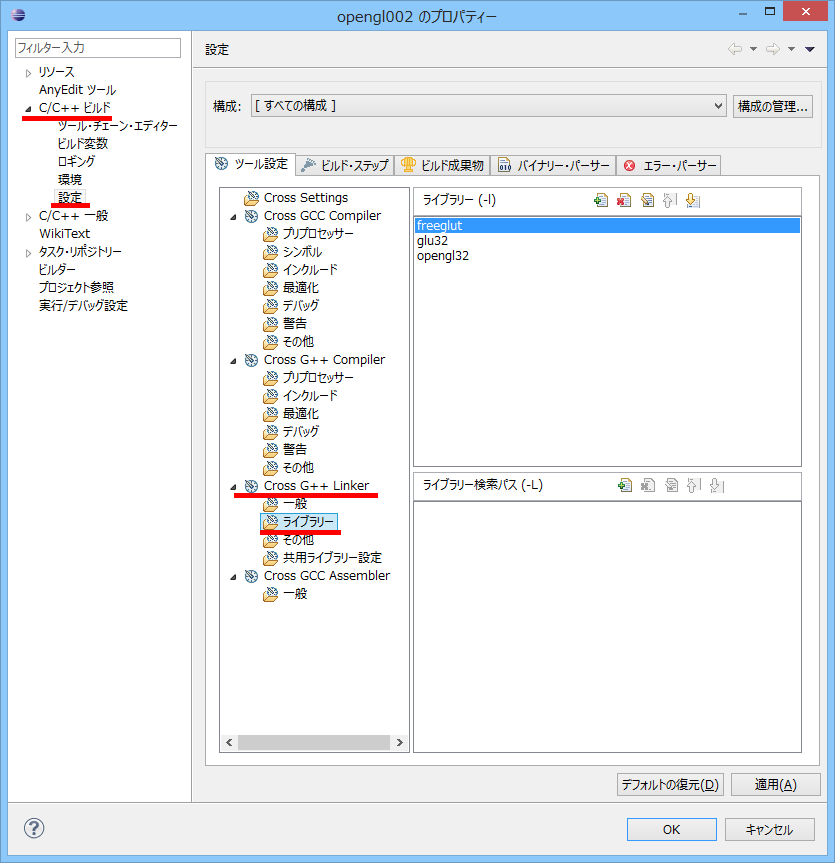
ビルドの設定をする。
リンカを設定する。
freeglut
glu32
opengl32


プロジェクトを右クリックして、構成のビルドから、すべてのビルビルドを選択する。
Debug フォルダが出来て、その中に、プロジェクト名.exe が出来る。

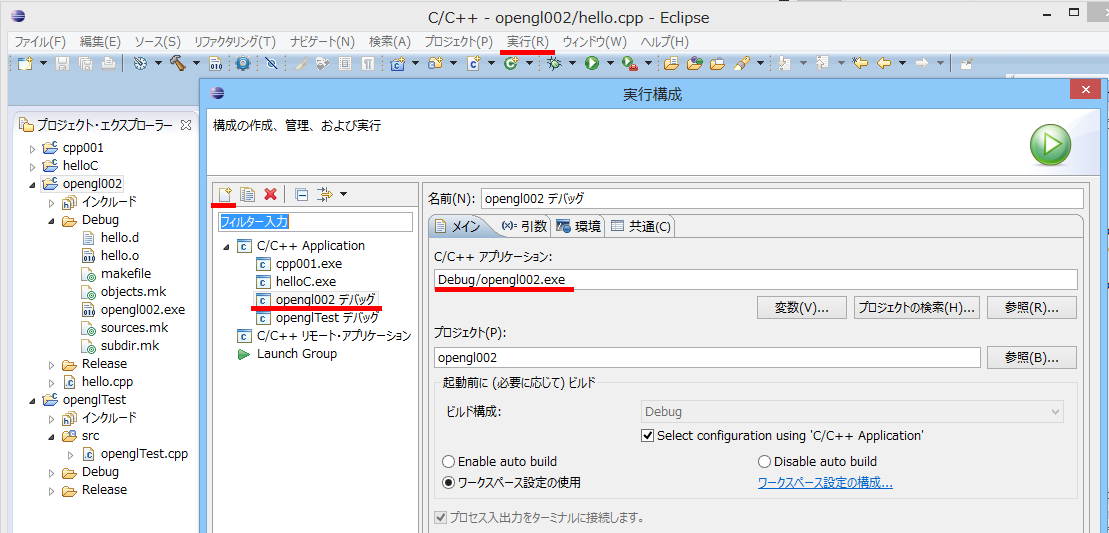
最初に実行する時は、実行の構成を設定する。

eclipse から実行した場合、コマンドプロンプトは出ない。


2013年12月8日日曜日

cocos2d-x を使ってみる

クロスプラットホームの開発が出来るという事で、cocos2d-x を使ってみたいと思います。

cocos2d-x-2.2.1.zip をダウンロードして解凍

Windowsアプリを作ってみたいと思います。

Visual Studio 用のプロジェクトを作るために、
{cocos2d-xのインストールディレクトリ}\tools\project-creator\create_project.py
を実行する必要があるので、Python をインストールする。

python-2.7.6.amd64.msi をダウンロードして実行する。
python-3は使えない。

>{pythonのインストールディレクトリ}\python create_project.py -project ProjectName -package com.jp.packagename -language cpp

を実行する。
{cocos2d-xのインストールディレクトリ}\projects
にプロジェクトが作成される。

プロジェクトをVisual Studio で読み込んで実行する。


左下の数字を非表示にするには、
classes フォルダの AppDelegate.cpp を開いて、
 // turn on display FPS
pDirector->setDisplayStats(false);

背景やボタンは、classes フォルダの HelloWorldScene.cpp で指定。

2013年12月6日金曜日

MinGW のインストール

gtkmm-win32-devel-2.10.8-1.exe をダウンロードしてインストール

パスを設定する
D:\MinGW\bin
D:\MinGW\msys\1.0\bin


確認する
>gcc -v

バージョンが表示されれば成功


hello.c
#include <stdio.h>

int main(void)
{
    printf("Hello world!\n");

    return 0;
}

>gcc hello.c

a.exe が出来上がる。
コマンドプロンプトから実行できる。

Makefile を作る。
SRC=hello.c
OBJS=$(SRC:.c=.o)
PROG=hello.exe
CC=gcc
CFLAGS=-Wall -O3
#LDFLAGS=-mwindows
RM=rm


%.o: %.c
 $(CC) $(CFLAGS) -o $@ -c $<

.PHONY : all
all: $(PROG)

$(PROG): $(OBJS)
 $(CC) $(OBJS) $(LDFLAGS) -o $@

.PHONY : clean
clean:
 $(RM) $(OBJS)

>make

hello.exe が出来る。